

A Firestick is every movie lover’s bread and butter. And why wouldn’t it be? It has thousands of movies and shows that you can watch on your Smart TV. Unfortunately, even the Firestick isn’t safe from the plight of geo-restrictions. Fortunately, you only need to install Surfshark on Firestick to eliminate this problem.
Most users utilize different VPNs for Firestick, but our top choice is Surfshark. This guide shows you how to install and use Surfshark on Firestick via its dedicated Fire TV app and a sideloading method. Now, let’s get to it, those movies aren’t going to stream themselves.
How to install the Surfshark Firestick app
- Subscribe to the Surfshark Firestick app by choosing a suitable pricing package. Surfshark is known to be a budgeted VPN, having the best deals.
- Once that’s out of the way and you’ve created your Surfshark account, head over to the Amazon App Store.
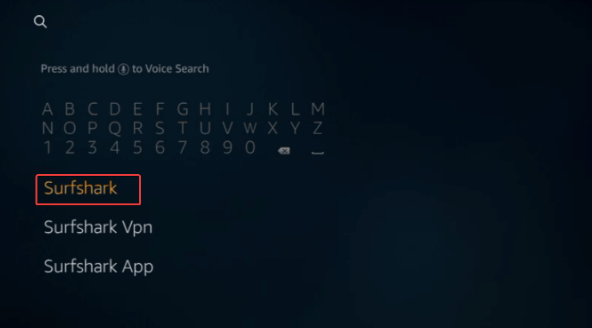
- On the search bar, type in Surfshark VPN and click on it.
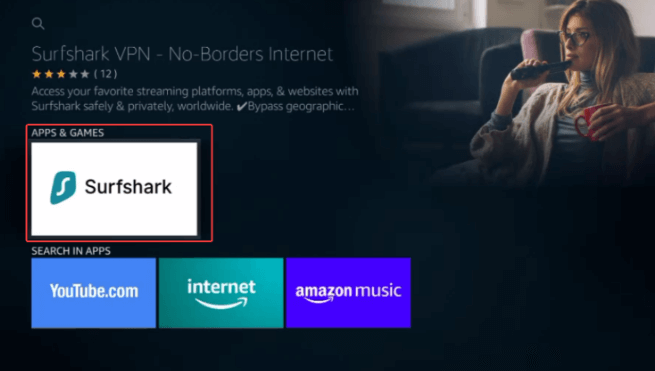
- Select the first Surfshark app under “Apps & Games”.
- Once done, click on the option that says “Download”.
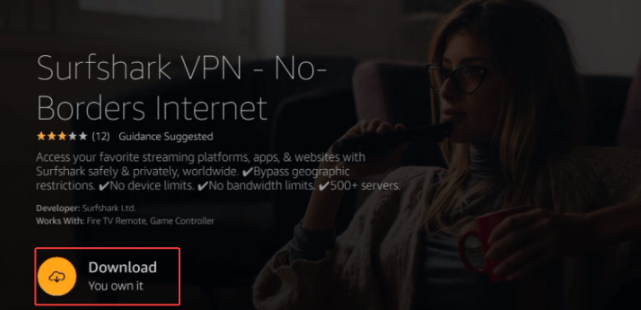
- Wait for the app to Download and Install the Surfshark Firestick app.
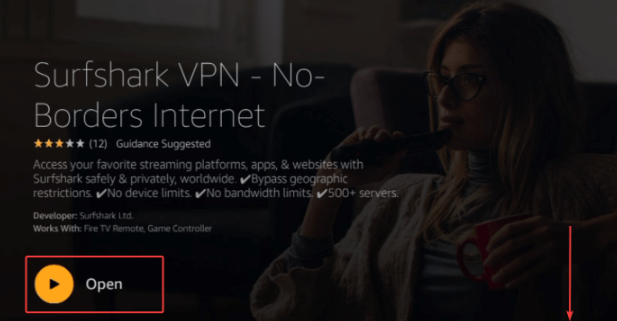
- Then click on “Open”.
You probably have many questions by now, like why even go through all this trouble to get a few extra shows? Is it even worth it?
Get Surfshark for Firestick Now
Why Install Surfshark on Firestick?
Installing Surfshark on Firestick will allow you to access more content and download amazing add-ons to make your streaming experience even more enjoyable. However, that’s not all. Surfshark also offers other benefits, the first of which is extra protection.
Streaming should be a risk-free business, but unfortunately, the world won’t let it stay like that. There are countless hackers, scammers, and threats on the internet out for your data. To protect yourself from these dangers, you need a VPN like Surfshark.
Your ISP and other malicious elements can also track and log your data. Even though you’re only streaming, you need to understand the importance of your privacy. To keep your data anonymous and your privacy intact, you’ll need a VPN like Surfshark.
Get Surfshark for Firestick Now
Sideloading the Surfshark Firestick app via APK method
You can easily download and install the Surfshark Firestack from the Amazon App Store. However, if you run into some problems, like geo-restrictions, or lack of accessibility, you can try sideloading the Surfshark application.
Here’s how you can Sideload the Surfshark app on your Firestick device:
Even though the Surfshark app is available on the Amazon App Store, there will still be some unfortunate circumstances. For instance, you won’t be able to access the app on the website due to restrictions, geo-blocks or maybe you just preferred getting an older version of the app.
Either way, just in case the app isn’t supported from where you are, there’s a workaround method available for you. So, here’s how you Sideload the Surfshark app on your Firestick device:
- On your Firestick, check to see whether you can download apps from unknown sources.
- If it does allow it, go to your Firestick “Settings” menu.
- Then click on the option that says “My Fire TV”.
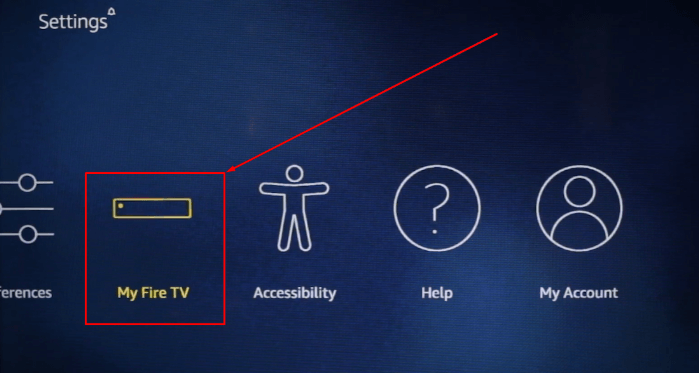
- After that, click on the option that says “Developer options”.
- Enable the “Apps from Unknown Sources”.
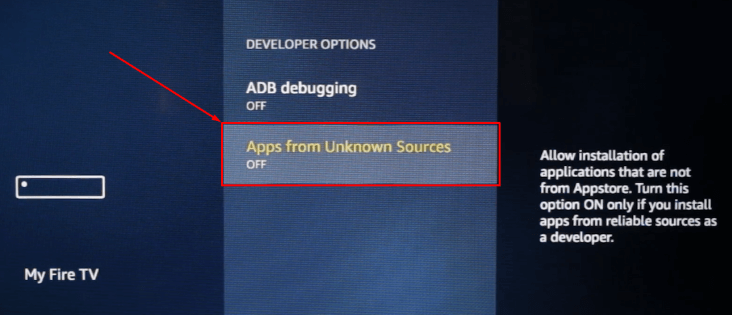
- Then click on “Turn On”.
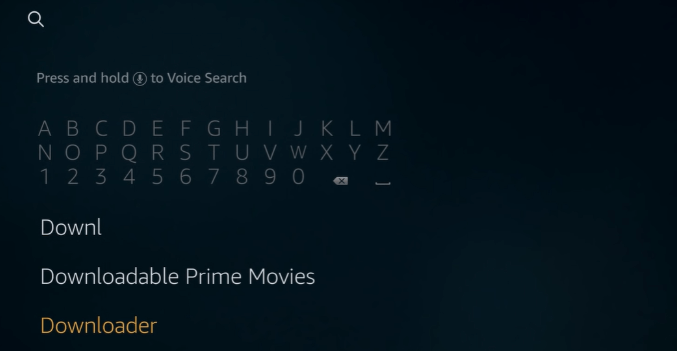
- Once that’s out of the way, head back to the homepage and proceed to install the Downloader app.
- In the search bar, type in “Downloader” and click on it.
- A lot of apps will open up, but click on the app that looks like this:
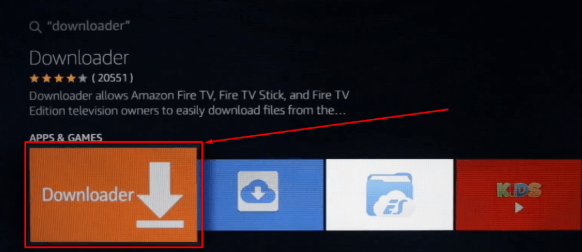
- Download and install the app, and then click on “Open”.
- Once you open the app, you’ll find a pop-up that requires you to enter the APK file URL. Head to the Surfshark website and copy the file link.
- (https://downloads.surfshark.com/android/Surfshark.apk).
- Come back to the Downloader app and enter the URL, like so:
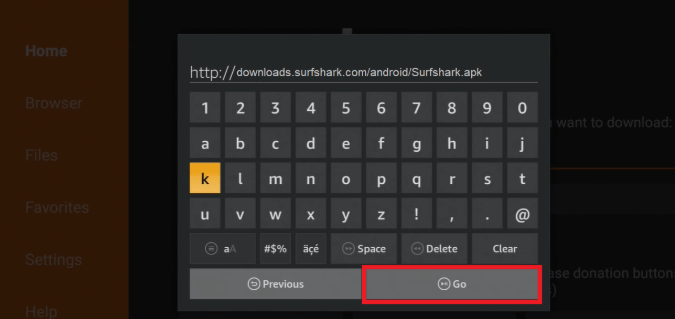
- Click on “Go”, and wait for the file to download.
- Once downloaded, you’ll receive another pop-up asking if you’d like to click on Install, Delete or Done. Click on “Install”.
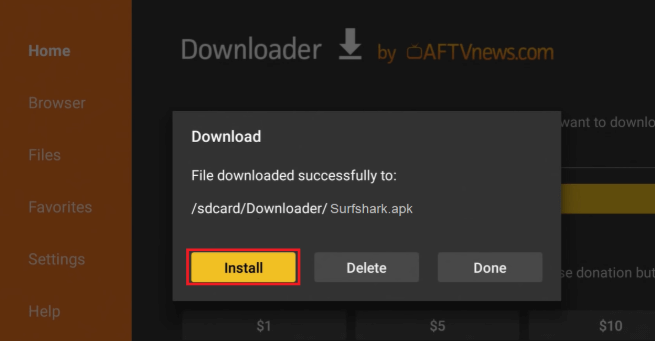
- Wait for the APK file to install and that’s about it! You now have your Surfshark app, which you’ll find in your list of apps.
Get Surfshark for Firestick Now
Install Surfshark on Firestick Via ES File Explorer
If you don’t want to use the downloader method, try ES Explorer. It’s just as convenient as the other methods. Here’s how you do it:
- Go to Firesticks “Settings” menu.
- Click on the “My FireTV” option.
- Click on the “Developer options.”
- Enable “Apps from Unknown Sources.”
- Go to the Homepage.
- Use the search bar to look for “ES File Explorer.”
- Click on Download.
- Wait for the application to Install and open it.
- Click the +New option at the bottom of the app.
- Enter the URL of Surfshark’s application (https://downloads.surfshark.com/android/Surfshark.apk) in the pop-up.
- Click Go and wait for the application to Install.
- Once installed, open it and use it!
How to use Surfshark on Firestick
You easily install and use Surfshark on Firestick devices, However, if you’re still having problems navigating the technical bits, here’s a simple guide:
- Download and Install the app.
- Open your Firestick.
- Find Surfshark under Apps & Games.
- Open Surfshark.
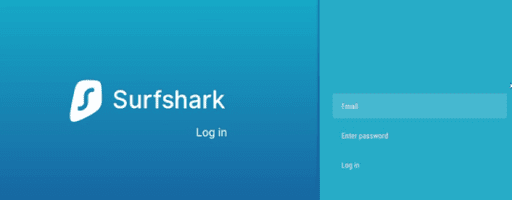
Sign in to your Surfshark account using the same email and password you used to subscribe to the VPN.
 Connect to the best server depending on your physical location or the streaming service you’re trying to unblock. Or just click on the “Quick connect” button
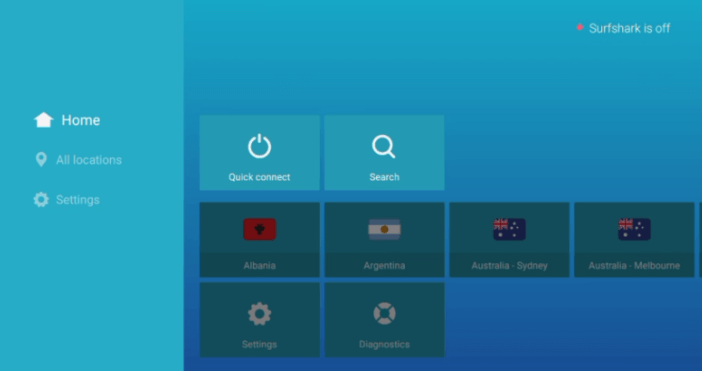
- You’ll then receive a pop-up icon asking you to accept the connection request.
- This will allow the app to connect to the best server. Like so:
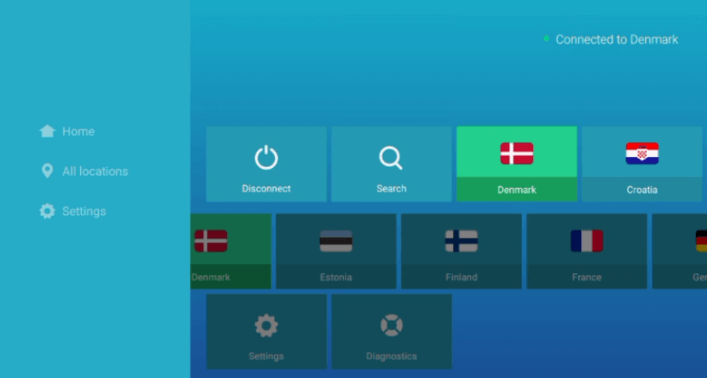
And that’s about it! You’re now ready to stream across borders and restrictions.
Can I use Surfshark on a first-generation Firestick?
Surfshark doesn’t support first-generation Firestick devices. However, there are always other methods to get started with the app. There are 2 ways where you can use the Surfshark app on your 1st generation device. They are:
- By using a router that is pre-flashed with router firmware. You can connect to any device that Surfshark doesn’t have a dedicated app.
- Most laptops and desktops come with the option of creating a Hotspot shield. You can use that connection to connect to multiple devices, including the First-generation Fire TV stick device.
Can I use Kodi on my Firestick using Surfshark and how to set it up?
Not many devices support Kodi, but fortunately, it works on Firestick. Additionally, you can use the Surfshark app to stream on Kodi. You might necessarily have to use Surfshark on Firestick because specific copyright laws are incorporated using add-ons on Kodi.
Surfshark will allow you to bypass any restrictions and increase your security and privacy on Kodi. Here’s how to get Kodi on Firestick:
- Turn your Firestick device on and open the Settings
- Then click on “Device,” followed by “Developer Options.”
- Turn on the “Apps from Unknown Sources”
- Return to the homepage, and look for the “Downloader” app.
- Download and Install the application.
- Find the URL of the Kodi App from this page (https://kodi.tv/download/)
- Enter the URL in the downloader box.
- Click on Download.
- Wait for it to Install.
- Once completely installed, sign in to your account and start streaming! (Carefully, of course)
If you need more help, there’s a guide dedicated to installing Kodi on Firestick. Read more about it, to get your streaming journey on the road.
What features can we get from the Surfshark Firestick app?
VPNs often limit their features regarding streaming devices and apps, but not Surfshark. If anything, Surfshark is even more robust on Firestick. Some of the features that you’ll get to enjoy on your Firestick are:
- 3200+ servers across 65 countries
- Unlimited device connections
- 256-bit encryption
- Access to unblock streaming services
- Kill Switch
- Split-tunneling
- Clean Web
- Whitelister
And much more!
Frequently Asked Questions
Can you use a VPN on Amazon Fire Stick?
You can use a VPN on FireStick. In fact, using a VPN for Firestick helps users bypass ISP throttling, gain access to the best streaming services, and get access to the best Fire TV apps like Kodi and more. The Surfshark Firestick app is the best because of its affordability and security features, fast speeds, and unlimited bandwidth. Plus, once you install the Firestick VPN app, you can use the VPN to download Disney Plus in Philippines, Mexico, and other countries.
What can I get from a Surfshark subscription?
With one Surfshark subscription, you get access to numerous streaming services, online protection, access to Firestick games, unlimited device connections, apps for numerous devices, and more.
Does Surfshark work with Firestick?
Yes, Surfshark works with Firestick, and you can easily get the app from the Amazon Store. To get started, go to your Fire TV homepage and go to the search bar. Type and look for “Surfshark” > click on the “Get” button and download the app on your Firestick device.
Can you use Surfshark for free on Firestick?
There is no Surfshark free trial available for Firestick, but you can hack a free trial for Firestick using the 30-day money-back guarantee. Simply sign up with Surfshark, download the VPN on your device, connect to the best server, and use the VPN for free on Firestick for 30-days. However, make sure you ask for a refund before the time frame ends.
Why is Surfshark not working on Firestick?
If you’ve installed Surfshark on Firestick and it’s not working, this could be due to a number of reasons. However, to fix the issue, you might have to clean your cache, and restore the Surfshark app back to its factory settings.
Can Surfshark unblock the US Netflix library on Firestick?
Yes, it can. With Surfshark on Firestick, you can access not only Netflix but can unblock 18+ libraries. All you have to do is Subscribe to Surfshark, download the Surfshark Firestick app, launch it and connect to the best server.
Does Surfshark work with Kodi?
Yes, Surfshark does work with Kodi and you can easily access it from anywhere in the world. Before getting started, make sure to check if the VPN is enabled, then connect to a Surfshark US server. Access or download Kodi on Firestick and get the best addons.
Can I use a free VPN for my Firestick?
You can, but it’s not something we would recommend. There are a few free VPNs for Firestick that work, but for a better experience on Firestick or better results, we recommend using a premium provider. Surfshark does come with a free trial, providing premium features for you to test the VPN, or you can hack a free trial using its 30-day money-back guarantee for your Firestick.
To conclude
Firestick is one of the best devices where you can get access to unlimited streaming platforms. However, some of its services are restricted because of geo-restrictions. It’s why many people use add-ons like Kodi and Surfshark to access more content. So install Surfshark today to get Kodi and unlock a new world of streaming.





